
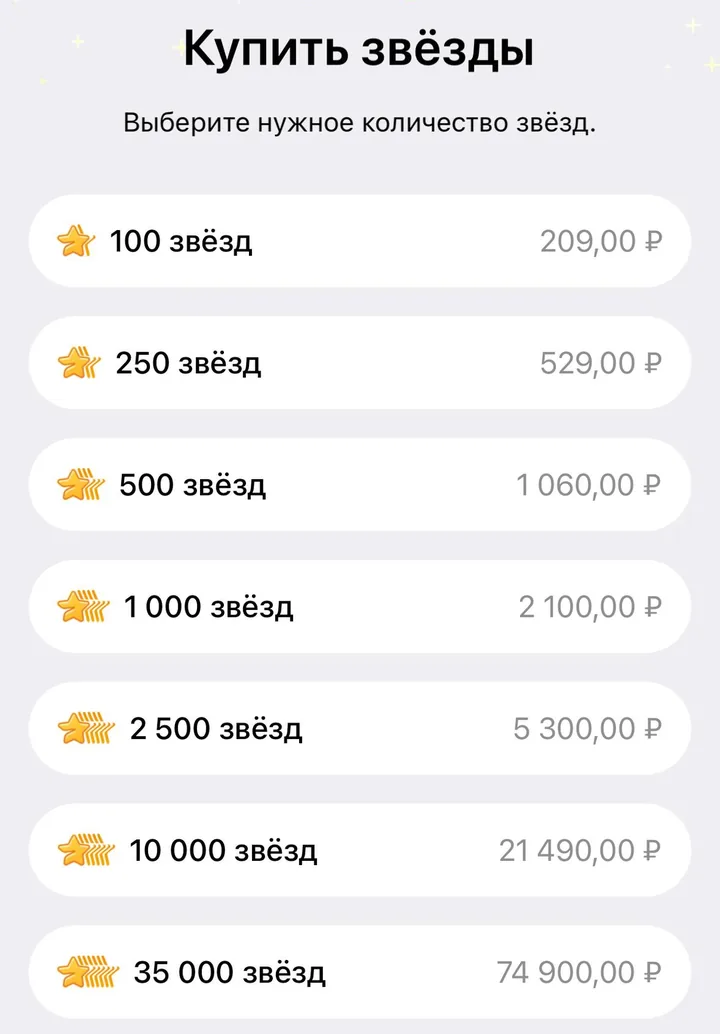
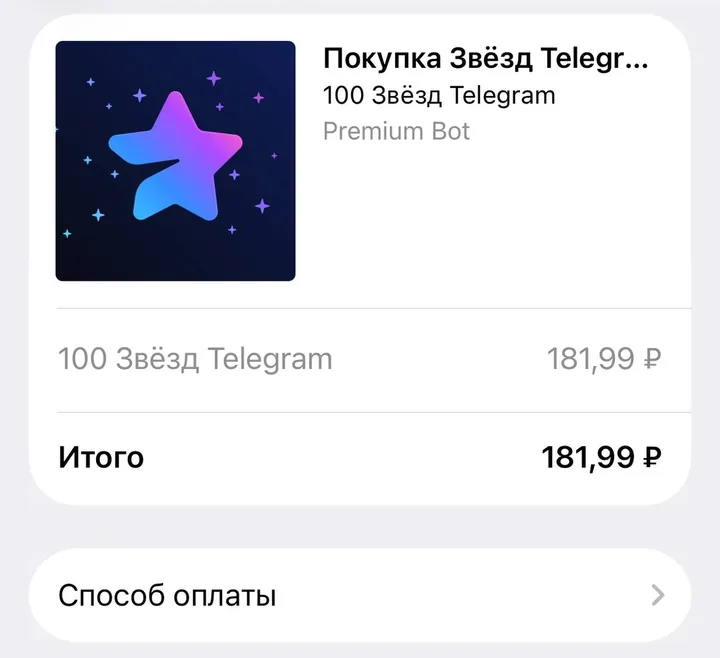
In screenshots taken on 18 November 2026, the same pack of 100 Stars on the same iPhone cost 209 ₽ in “My Stars” and 181.99 ₽ in @PremiumBot. That is a difference of 27.01 ₽, almost 13%. Here is what Telegram Stars are, where the price difference comes from and where to see the final amount before you pay.
What Telegram Stars are
Stars (Telegram Stars, ⭐) are Telegram’s in-app currency. You buy them with regular money and spend them inside Telegram: on gifts, Telegram Premium gift subscriptions and digital goods and services in bots and mini apps. Your balance is in Settings → My Stars.
Here are two ways to top up your balance in Telegram:
- in the Telegram app — Settings → My Stars;
- through the official bot @PremiumBot
with the
/starscommand.
Under Telegram’s terms, Stars cannot be withdrawn, sold or transferred to another person. Buying Stars is final: Telegram does not refund Stars bought by mistake or that you no longer need.
One pack, two prices: examples with screenshots
The screenshots were taken on 18 November 2026. Prices depend on the country, the currency and the way you buy, and they change over time, so your amounts may differ.
100 Stars on the same iPhone in Russia
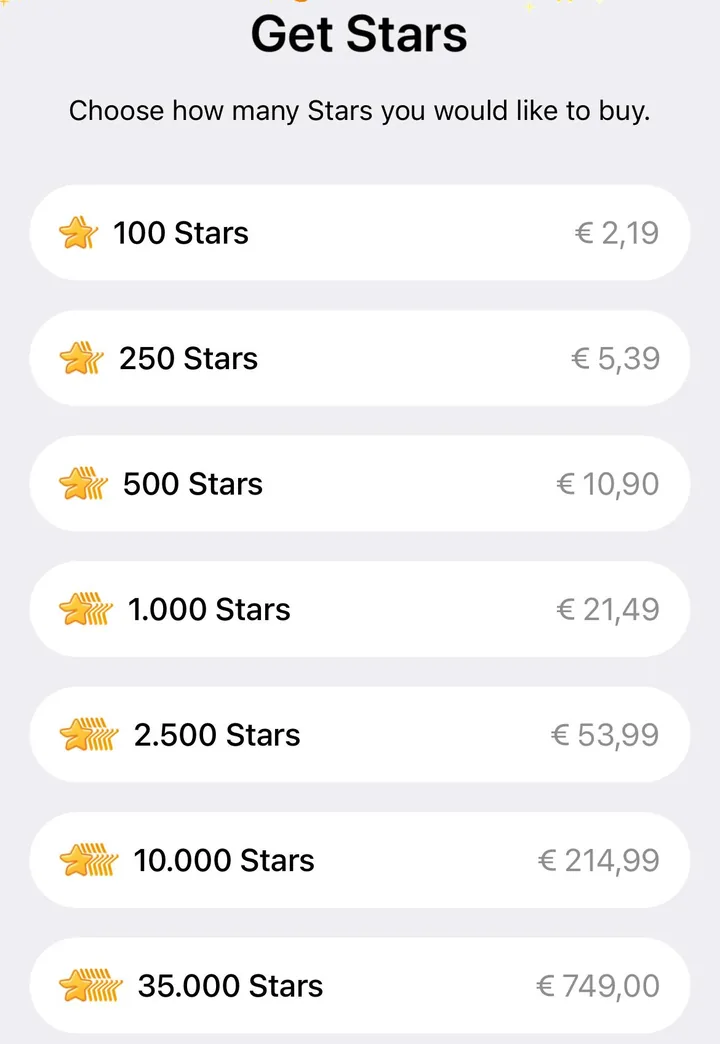
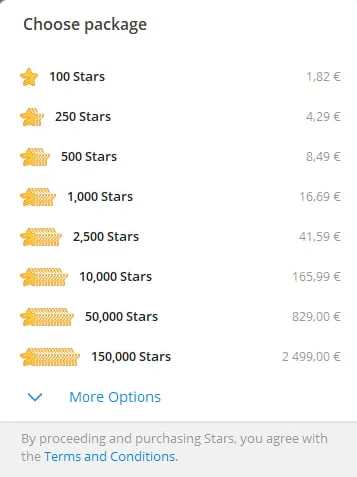
1,000 Stars with prices in euros
| Pack | First price | Second price | Difference |
|---|---|---|---|
| 100 Stars, same iPhone | 209 ₽ in My Stars | 181.99 ₽ in @PremiumBot | 27.01 ₽ (≈13%) |
| 1,000 Stars, prices in euros | €21.49 on iPhone | €16.69 on a computer | €4.80 (≈22%) |
Whether a bigger pack is cheaper depends on how you buy. On the iPhone, one Star cost 2.09 ₽ in the 100-Star pack and 2.10 ₽ in the 1,000-Star pack. On the computer, with prices in euros, a Star in the bigger pack was about 8.3% cheaper. To compare packs, divide each price by the number of Stars. Stars you have bought cannot be refunded, so buy as many as you need for your next purchases.
Why prices differ
When you buy through the App Store, Google Play or @PremiumBot, the final price may differ. It can be affected by:
- Payment provider fees. Each way of buying has its own provider and its own fee.
- Local taxes. In some countries a tax such as VAT is added to the price.
- Conversion rate. The provider may convert the price into your currency at its own rate.
This is stated in the Telegram Stars terms and in the developer documentation: amounts may vary because of VAT and other fees outside Telegram’s control. The screenshots cannot tell what exactly made up the 27.01 ₽ difference: the payment screen shows only the final amount.
Why bots are paid in Stars
The App Store and Google Play have rules for selling digital goods inside apps. To keep bots and mini apps available on phones, Telegram requires that digital goods and services in bots are sold for Stars only. Physical goods can still be paid for by card and other methods.
For you this means one thing: a bot shows its price in Stars, not in rubles or euros. What the Stars themselves cost depends on where you buy them. When you pay with Stars, the bot does not get your card details.
How not to overpay for Stars
- Open My Stars and note the price of the pack you need.
- Open @PremiumBot, send
/starsand compare the price of the same pack. - If buying in @PremiumBot is not available on your phone, compare the price in Telegram on a computer or in Telegram Web.
- Buy where the final amount is lower. Stars belong to your account: Stars bought on a computer are available on your phone too.
Step-by-step instructions with direct links are in How to top up your Stars balance.
How to pay TAK! TEXT with Stars
TAK! TEXT is a bot that turns voice messages, audio and video into text. Its plans and minute packs are paid for in Stars.
- Open @taktextbot
and send
/premium. - Choose a plan or “🎧 Minute packs”. For example, a 70-minute pack costs 140 ★ and is valid for 365 days.
- Check the price in Stars on the card and tap “Pay”.
- Telegram opens a payment form with the amount in Stars: confirm it. If you do not have enough Stars, top up your balance and come back to pay.
Plans renew every 30 days, also in Stars. If you turn off auto-renewal, the paid plan stays active until the date shown in /balance. If Stars were charged but the plan or minutes did not appear, contact support.
Frequently asked questions
Where are Telegram Stars cheaper?
In our examples they were cheaper in @PremiumBot and in Telegram on a computer than in the iPhone app. But prices depend on the country and the currency, so compare the final amount of the same pack before you buy.
Can I get a refund for Stars?
Buying Stars is final: Telegram does not refund Stars bought by mistake. If Stars were charged for a purchase in a bot and you did not get the product or service, contact that bot’s support.
Can I buy Stars on a computer and spend them on my phone?
Yes. Your Stars balance belongs to your Telegram account, not to a device.
Why doesn’t the bot accept card payments?
Telegram requires digital goods and services in bots to be sold for Stars only. You pay by card when you buy the Stars themselves.